
|
Size: 1037
Comment:
|
Size: 1149
Comment:
|
| Deletions are marked like this. | Additions are marked like this. |
| Line 1: | Line 1: |
| <<TableOfContents()>> |
|
| Line 11: | Line 9: |
| <<TableOfContents()>> | |
| Line 24: | Line 23: |
| '' | |
| Line 26: | Line 24: |
| Select Inbox from the folder type drop-down menu. Enter the Title of your shared folder in the search box. Select your Shared Mailbox from the list. Select Open. '' |
{{attachment:mac-shared-folder-open-user-folder.png}} 1. Select Inbox from the folder type drop-down menu. 1. Enter the Title of your shared folder in the search box. 1. Select your Shared Mailbox from the list. 1. Select Open. [[attachment:mac-shared-folder-search]] |
PUBLIC PAGE
Adding a Shared Mailbox in Outlook for Mac
Instructions for adding a shared mailbox to your account in Outlook for Mac with your Office 365 account.
19 March 2020
- Open Outlook for Mac.
- Select File.
- Select Open.
- Select Other User's Folder.
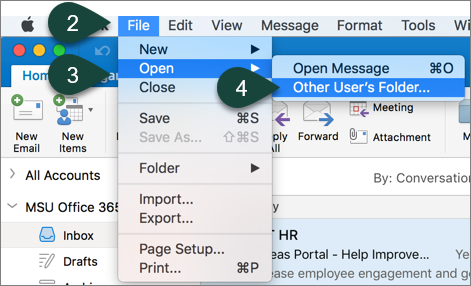
- Select Inbox from the folder type drop-down menu.
- Enter the Title of your shared folder in the search box.
- Select your Shared Mailbox from the list.
- Select Open.